What can UnStill do? Explore the core capabilities of an AI-powered animation tool
Explore how UnStill, an AI-powered animation tool, creates 2D & 3D scenes, simulations, narration, interactive experiences, and visual explanations.
On this page
- That is where an AI-powered animation tool such as UnStill becomes different.
- That is what makes many of its core capabilities possible.
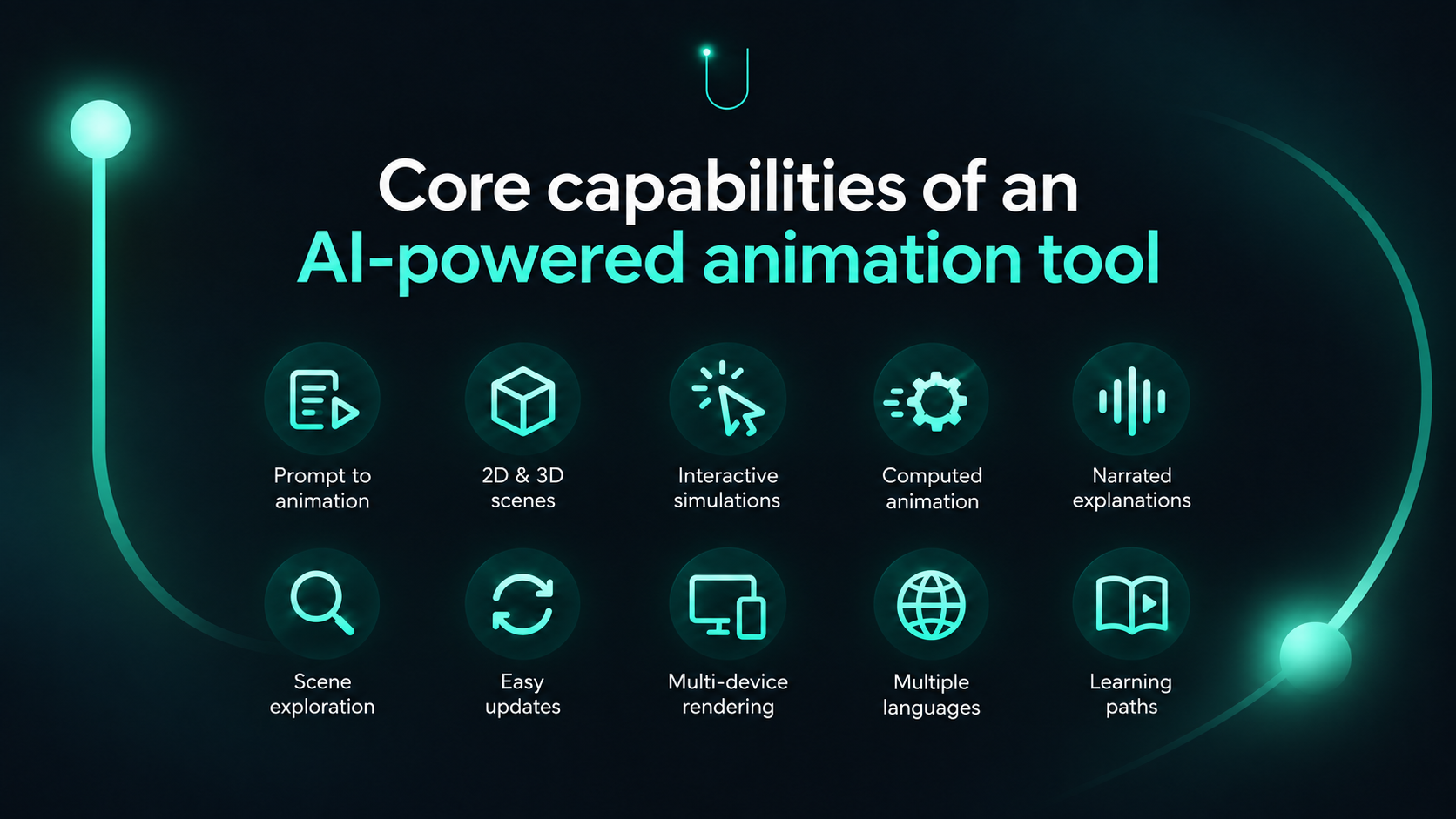
- 1. Turn a written idea into an animated explanation
- 2. Build 2D and 3D visual scenes
- 3. Create simulations where movement is part of the explanation
- 4. Use real computation to drive the animation
- 5. Bring narration, labels, movement, and camera direction together
- 6. Let the learner explore the scene
- 7. Update and improve explanations over time
- 8. Use the same scene across devices and languages
- 9. Build towards experiences that can answer questions
- 10. Connect individual explanations into a learning path
- What do these core capabilities change for the learner?
Most digital learning content still asks the learner to do one thing: watch. You open a video, press play, and follow whatever has already been decided for you. The camera angle is fixed, the sequence is fixed, and the explanation moves at the pace chosen by the creator.
That works well for many topics. But it also means the learner is mostly outside the experience.
The more interesting shift is towards content that can be explored, interacted with, updated, and understood from different angles.
That is where an AI-powered animation tool such as UnStill becomes different.#
UnStill is built to turn ideas into visual explanations that can include 2D and 3D scenes, animation, narration, simulations, camera movement, labels, and interaction. The aim is to help people create explanations that make processes, systems, and relationships easier to understand. At the heart of UnStill is one important idea: the scene remains structured rather than becoming only a finished recording.
That is what makes many of its core capabilities possible.#
1. Turn a written idea into an animated explanation#
The starting point can be as simple as a description of what you want to explain. You might ask UnStill to show how an escalator works, how DNA replication happens, how helicopter steering changes direction, or how an algorithm processes information.
From that description, UnStill can build the elements needed for the explanation – objects, movement, labels, narration, camera positions, transitions, and timing.
This is an important capability of our AI-powered animation tool because the person creating the explanation does not need to begin with animation software or technical modelling skills. They can begin with the concept itself. The tool then helps turn that idea into something visual.
2. Build 2D and 3D visual scenes#
Different ideas need different types of explanation. Some concepts are best shown through a simple 2D diagram. Others need depth, perspective, scale, or movement through space. UnStill can create both 2D and 3D scenes depending on what the concept requires.
A biology topic may need labelled structures and movement between different parts. A mechanical explanation may need a 3D view of components working together. A computer science topic may be clearer as a visual sequence showing how data moves through a system.
The point is not to force everything into one visual style. The capability lies in choosing a visual form that helps the idea make sense.
3. Create simulations where movement is part of the explanation#
Some topics cannot be explained clearly through static visuals alone. They involve change. A planet moves through an orbit. A value changes during an algorithm. A component rotates. A force changes direction. A biological process progresses through different stages.
UnStill can turn these ideas into simulations where movement becomes part of the explanation itself. This helps the learner see not only what something is, but also how it behaves over time.
4. Use real computation to drive the animation#
One of the most distinctive capabilities of UnStill is that the visual can be driven by the actual calculation behind the concept. For example, an orbital simulation can solve Kepler's equation so the planet genuinely changes speed as it moves through its orbit. A machine-learning scene can run a real gradient-descent calculation, with the resulting values driving the animated curve and the explanation around it.
This means the visual is not simply designed to resemble the process. In the right use case, the process itself determines what the learner sees. That makes computation part of the explanation, which is especially useful for scientific, mathematical, and technical topics where correctness matters.
5. Bring narration, labels, movement, and camera direction together#
A visual explanation works best when each element supports the same idea. UnStill combines narration, labels, animations, camera movement, and scene transitions into one structured experience.
The camera moves towards the part being discussed. A label appears at the right moment. An object begins moving when the narration explains what is changing. These elements work together rather than feeling like separate layers added afterwards.
This is especially useful for complex topics because it helps guide the learner's attention. Instead of asking them to decide where to look, the experience can help show them what matters at each stage.
6. Let the learner explore the scene#
UnStill scenes remain interactive. That means the learner can do more than simply follow the sequence from beginning to end. Depending on how the scene is created, they are able to pan, orbit, replay, or look at an object from another perspective.
This is where visual learning starts to become more exploratory. A learner might understand the overall explanation but still want to inspect one particular structure more closely. Another may want to replay a stage or look at the same model from a different angle. The scene gives them room to do that.
7. Update and improve explanations over time#
Learning content changes. A label may need correcting. A factual detail may need updating. A narration line may need refining. Because an UnStill scene is structured and text-based, individual parts can be edited without rebuilding the entire experience from the beginning.
The renderer can also improve over time. UnStill has already seen this happen with improvements such as better outline geometry and stronger label colour contrast. Once the engine improved, existing scenes benefited too. This means the experience can continue to improve even after it has been created.
8. Use the same scene across devices and languages#
An UnStill scene can render according to the device it is being viewed on. The same underlying scene can work across phones, laptops, and higher-resolution displays without being tied to one fixed output size.
The same visual can also be reused across languages. Narration and on-screen labels can change while the underlying animation stays the same. UnStill supports this approach across roughly 32 languages. This makes one explanation more reusable without recreating the visual experience each time.
9. Build towards experiences that can answer questions#
Because objects, labels, chapters, and other scene elements remain structured, the UnStill player can understand what is present at a particular moment. That creates an interesting next step. A learner could eventually pause a scene and ask:
- ‘What is this part?’
- ‘Why is this moving?’
- ‘What happens next?’
This is a planned capability, but it follows naturally from the way UnStill scenes are built. The scene contains the information needed to understand what the learner is looking at.
10. Connect individual explanations into a learning path#
The same structured format can also help connect one concept to another. A scene can eventually declare what knowledge it assumes. This makes it possible to build prerequisite relationships between topics.
Instead of seeing a collection of unrelated explainers, a learner could understand:
- What should I know before I start this?
- What should I learn next?
This opens the door to concept maps and knowledge graphs that help learners move through topics more deliberately.
What do these core capabilities change for the learner?#
The real capability of our AI-powered animation tool, UnStill, is not simply that it can create animations quickly.
It can turn an idea into something that can be seen, followed, explored, updated, translated, and eventually questioned.
That changes the role of animation in learning. It becomes more than a visual layer placed on top of an explanation. It becomes part of how the explanation itself works.
And that is where UnStill is focused – helping complex ideas become easier to see and easier to understand.
Try UnStill here. Your first video generation is completely free. For business queries, pricing discussions, or to schedule a demo, you can call us at +91 8700506796 or write to us at gounstill@gmail.com